
After a long Claude Code session, everything I sent came back with an “input is too long” error. I ran /compact in a hurry, and then the compaction itself failed. Completely stuck.
Short answer: pressing Esc twice to rewind the conversation got me out of it.
Below: the symptom, why auto-compact didn’t save me, three things to try, how to prevent it. It should help anyone hitting the same error in Claude Code, especially if you pay per use through Amazon Bedrock.
Symptom: every message errors, /compact fails too
Any normal instruction got only an error saying the request was too long. So I ran /compact, which summarizes the conversation to slim it down, and got this:
Error during compaction: API Error: 400 Input is too long.
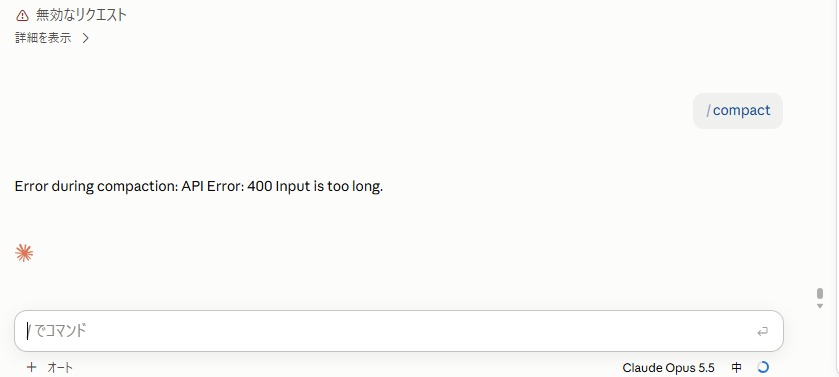
Running /compact again gave the same result every time. Switching to a 1M-context model, then running /compact, failed with the same error too.
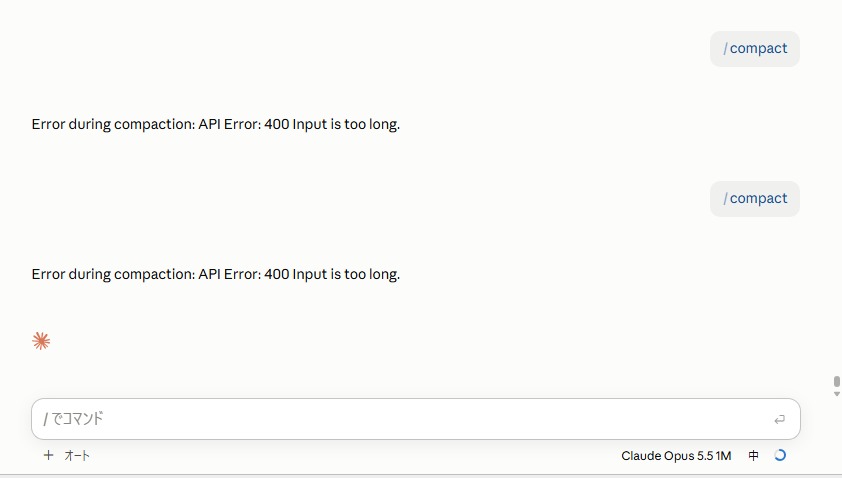
To summarize, it has to send the whole conversation, which is already over the limit. There’s no way forward from inside.
Cause: overflow in one go beats auto-compact
Claude Code has auto-compact, which summarizes automatically when the context (how much the conversation holds) gets large. So why did I get stuck?
Auto-compact kicks in between responses, when it judges the context is getting full. If a single action inflates the context all at once, the check comes too late:
- You’re at about 80% of the limit, not yet at the auto-compact line
- Reading a big file or a long log, or a subagent returning a long report, adds a lot at once
- The limit is exceeded before the next check
- Once over, compaction has to send everything too, so
/compactitself fails
In short: if the context grows gradually, auto-compact saves you; if it overflows in one go, you’re stuck.
Three fixes
Try them in this order:
| Fix | What to do | Cost | Context |
|---|---|---|---|
| 1. Rewind, then compact | Press Esc twice, go back to a message before the overflow, run /compact |
None extra | Mostly kept |
| 2. 1M model just for compaction | /model sonnet[1m] → /compact → switch back |
Premium for one compaction | Kept (didn’t work for me) |
| 3. Start over | /clear, resume in a new session |
None | Lost |
1. Rewind, then compact: this undoes the step that caused the overflow (reading a big file, say), so it works best. After rewinding you’re right at the edge, so run /compact immediately.
2. 1M model just for compaction: in theory a 1M-context model can take the whole conversation, so compaction should go through. But for me, /compact still failed after switching to a 1M model (see the screenshot above). It isn’t reliable; treat it as something to try when rewinding isn’t possible. Tokens beyond 200K cost extra, so if you try it, switch back as soon as compaction finishes.
3. Start over: if the work is saved in git or files, asking a new session to “check the state of the repository, then continue” is usually enough.
The steps that actually fixed it
Fix 1, rewinding, got me back:
- Press Esc twice in the Claude Code input box
- A list of earlier messages appears. Pick one from before the errors started
- From that point on, responses came back normally
- You’re near the limit, so run
/compactright away
Pressing Esc twice opens this “rewind” screen, listing the messages you sent. Pick the point to go back to (message contents blurred; my app is in Japanese).

What overflowed it: images
Once rewinding had the conversation working again, I had Claude investigate the cause itself. The answer: too many images loaded to check how my documents looked.
- The conversation held 49 images (about 28MB total), each a large image showing 6 document pages side by side
- One image costs thousands of tokens, then never leaves the conversation once loaded
/compactalso sends the whole conversation, images included, before summarizing, so the compaction request itself exceeded the limit- The previous conversation had stopped with the same error at 86 images
When making documents, I often show Claude the result as an image to check. Each one is small, but as checks repeat, images pile up in the conversation until at some point the limit is blown in one go. Exactly the “overflow in one go” pattern.
Preventing it
/clearat each task boundary: don’t keep one conversation going forever- Don’t have it read big logs or files whole: narrow it down, e.g. “extract only the errors”, “look only at that part”
- Check in
/configthat auto-compact is on: if it’s off, even gradual growth won’t be rescued - Hand research to subagents: they return a summary, so the main conversation grows more slowly
My rules for checking with images
For checking document visuals (the cause this time), I had Claude remember this order:
- Check with code first: font size, overflow, overlaps, missing borders: anything measurable can be detected without looking at an image
- Let subagents look at every page: one page at a time, reporting “page number, where, what’s wrong” in a fixed format. No images pile up in the main conversation
- The main Claude looks only at pages flagged as problems: one page per image, not shrunk
- Finally a human looks
I worried that fewer images would make checks less accurate, but I think it’s the opposite, for two reasons:
- Six pages in one image were coarse to begin with: images given to Claude are shrunk automatically. Mine showed at 2000×1688, so each page was only about 1000px wide, with 8-9pt text mostly smudged. One page per image makes small overflows easier to spot, at about 2,200 tokens per image, which is light for a few pages
- Don’t take a subagent’s “no problems” at face value: a bare summary is easy to trust blindly. Making it return where, what lets you catch misses
Code only catches what can be measured, though. The harshest feedback this time was about readability (“unclear what it’s trying to say”, “colors are messy”), which a machine can’t judge. The final human check can’t be skipped.
A chat full of images stays near the limit even after rewinding gets it working, so /compact still won’t run. Keep going and it jams again. It’s better to have Claude write a handover note to a file (current file version, what’s done, what’s left, decisions made), then move to a new chat. Rules saved to memory carry over to a new chat, but work progress doesn’t.
Bonus: going multi-agent multiplied my bill by 2.5
Shortly before this trouble, I tried running Claude as a team (“1 leader plus 3 members”) to get parallel work. My Bedrock bill came out over 2.5 times a normal month.
The reason is simple. Each member starts from a blank slate every time, so each one rereads the same code. On top of that, the leader reading reports then writing instructions burns tokens too.
Multi-agent setups pay off for independent tasks, like gathering broad research in parallel. For tightly coupled work like coding, quality doesn’t improve much.
My current conclusion:
- For parallel work, hand independent tasks to separate sessions, acting as the leader yourself
- Give one piece of work to one session (it uses subagents by itself when needed)
- Assign cheaper models (Sonnet etc.) to subagents to keep costs down
Summary
- If “input is too long” makes even
/compactfail, first rewind with Esc twice - Switching to a 1M model didn’t make
/compactwork. If you can’t rewind, start over with/clear - The cause is overflowing in one go. Don’t load big logs or files whole;
/clearat task boundaries - For me, it was too many images for document checks. Check with images only on pages that have problems


コメント