
I recently learned on X (Twitter) that the ChatGPT desktop app lets you create your own pet. This blog is usually about Claude Code, but this time it’s OpenAI’s coding agent, Codex. I had an illustration of a girl that Codex drew for me earlier, so I asked it to build a ChatGPT desktop pet of that character from scratch.
Short answer: one illustration plus a two-line request was enough. Codex redrew her as a chibi, generated 9 animations with subagents, then registered the pet; I only answered its questions along the way. Unless stated otherwise, everything below was done automatically by Codex, not decided by me.
The request I sent
This was the whole request (originally in Japanese):
“Can you make a pet character for the ChatGPT desktop app with the same character?
Don’t just reuse the artwork; base it on the artwork but make a 2-heads-tall chibi that suits a pet.”
Codex asked which app or feature it should appear in; I said the ChatGPT desktop app. It then said it could make 9 animations following the official creation steps, asking whether it could split the image generation across several subagents. I let it.
Codex: “With the official hatch-pet steps, I can make 9 animations such as idle, walking, waving. May I proceed using subagents to share the image generation?”
Me: “Go ahead with subagents in parallel.”
Original art vs. the chibi version
Here’s the original illustration:

And here it is redrawn as a 2-heads-tall pet, keeping the hairstyle, outfit features:

From there Codex split the generation of each motion among several subagents, producing 9 poses at once: idle, moving left/right, waving, jumping, etc. Transparency, file formatting, checks were all handled by Codex too.
The finished pet in motion
Previews made from the finished assets. On the desktop, they’re meant to be shown at about this small size.



Still the same character, now a cute chibi pet. From handing over one illustration to this, it was all automatic.
Setting it up, seeing it move
Opening the pet settings shows it registered as “Pink Ribbon”, alongside the official pets like Mini, Codex. (My app is in Japanese, so the screenshots show Japanese UI.)

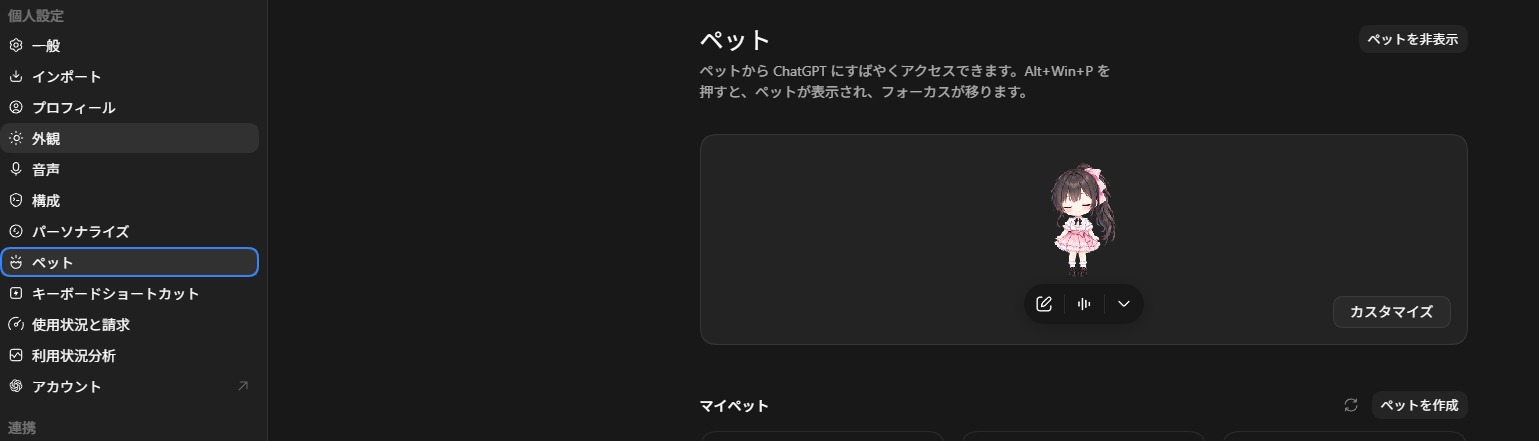
Select it, and it floats small on the desktop. This is the actual display size:

Drag it with the mouse and it runs left or right; send a chat and it shows a “thinking” pose before replying. Here it is in action:
Wrapping up
I didn’t record the time or cost, so I won’t give numbers. Still, it was fun that one illustration plus a short request produced this much character art, automatically, all the way to running on my desktop. If you have a similar drawing, you can do the same.
[Update, November 2026] After this, I also had Codex make a desktop pet that runs on Windows alone, without ChatGPT. It tells you when Claude Code is waiting for approval, with a click taking you back to the right tab. It’s available with source code: A desktop pet that tells you when Claude Code needs approval


コメント