
I wanted to use ChatGPT Desktop plus Codex on a Windows EC2 instance in the Tokyo region. But instead of signing in to an OpenAI account to connect directly, I needed them to go through Amazon Bedrock Runtime. The EC2 instance already had an IAM role, with aws sts get-caller-identity confirmed to return it. This is the record of getting Codex running through Bedrock from there. The real subject isn’t just a successful procedure, but narrowing down the error that came up along the way.
Short answer: set model_provider = "amazon-bedrock-runtime" in ~/.codex/config.toml, then add model_reasoning_summary = "none" at the top level. Without that last line, GPT-5.6 Sol on Bedrock rejects every request with unsupported_parameter, even though /status looks fine.
The setup I had in mind:
Windows EC2 (Tokyo)
    ↓
EC2 Instance Profile / IAM Role
    ↓
Codex / ChatGPT Desktop
    ↓
amazon-bedrock-runtime
    ↓
Amazon Bedrock Runtime
    ↓
global.openai.gpt-5.6-sol
Where I first got stuck
After installing, ChatGPT Desktop asked me to sign in. I wanted to avoid signing in to an OpenAI account, so I left it there for the moment.
Then I tried the AWS CLI in PowerShell, only to find it wasn’t installed at all:
The term 'aws' is not recognized as the name of a cmdlet...
With the AWS CLI installed, I ran:
aws sts get-caller-identity
It showed the IAM role assigned to the EC2 instance. Meanwhile, this returned nothing:
aws configure get region
This time the region is set explicitly in the Codex config, so an empty AWS CLI default region was no problem.
Installing Codex CLI
Installing ChatGPT Desktop alone didn’t give me a working codex command, so I installed Codex CLI separately, just running the usual install command in PowerShell:
powershell -ExecutionPolicy ByPass -c "irm https://chatgpt.com/codex/install.ps1 | iex"
The version I ended up with:
OpenAI Codex v0.155.0
Starting codex right after installing asked for sign-in, just like ChatGPT Desktop. I didn’t want that here either, so I closed Codex, then rewrote config.toml for Bedrock first.
Settings for Bedrock Runtime
At the top of ~/.codex/config.toml I set:
model = "global.openai.gpt-5.6-sol"
model_provider = "amazon-bedrock-runtime"
For the region, I appended this at the very bottom of the file:
[model_providers.amazon-bedrock-runtime.aws]
region = "ap-northeast-1"
In TOML, every key = value after a bracketed line (a table), up to the next table, belongs to that table. When you append to an existing config.toml as I did, adding lines at the bottom without knowing which table you’re in can drop them into the wrong table. Keep top-level settings like model, model_provider apart from settings that belong inside a specific table like [model_providers.amazon-bedrock-runtime.aws], wherever they sit in the file.
Since it uses the EC2 IAM role, I configured no access key, no secret key, no ChatGPT login. Starting Codex, running /status showed:
Model:          global.openai.gpt-5.6-sol (reasoning low, summaries auto)
Model provider: amazon-bedrock-runtime
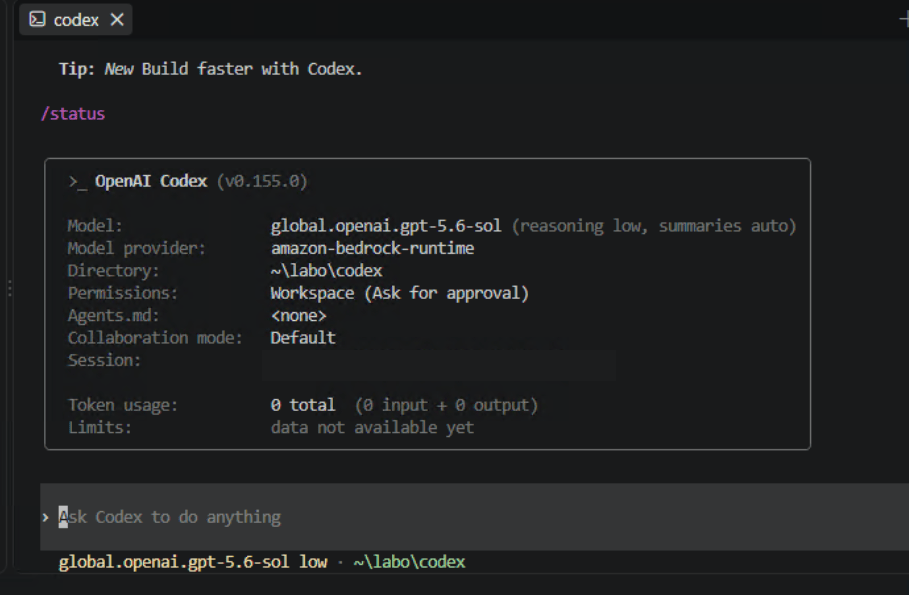
At this point Codex had clearly read config.toml, starting with Bedrock Runtime as the provider. I relaxed here, but there was more to come.
The biggest trap: /status looks fine, yet no reply
I typed “hello” into Codex as a test. No reply came back from the model, just this error:
{
  "error": {
    "message": "Unsupported parameter: 'reasoning.summary' is not supported with the 'global.openai.gpt-5.6-sol' model.",
    "type": "invalid_request_error",
    "param": "reasoning.summary",
    "code": "unsupported_parameter"
  }
}
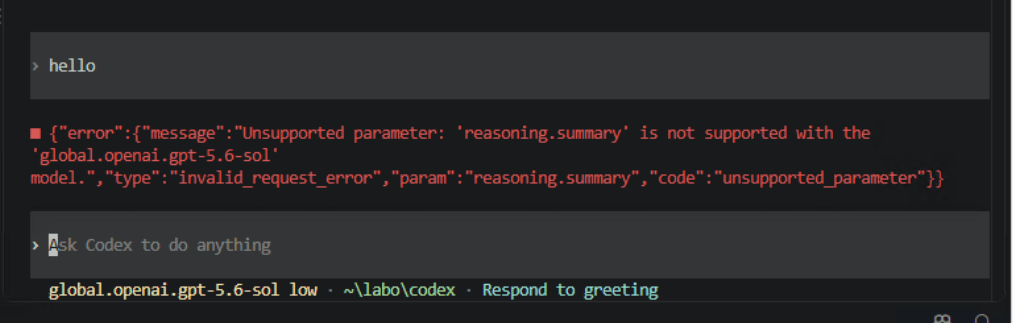
The parts to look at are "param":"reasoning.summary" plus "code":"unsupported_parameter". It wasn’t denied by IAM or network permissions. The request reached Bedrock, where GPT-5.6 Sol rejected a parameter Codex sent, reasoning.summary. The flow:
Codex
  ↓
sends a request including reasoning.summary
  ↓
Bedrock Runtime / GPT-5.6 Sol
  ↓
"this parameter is not supported"
  ↓
400 invalid_request_error
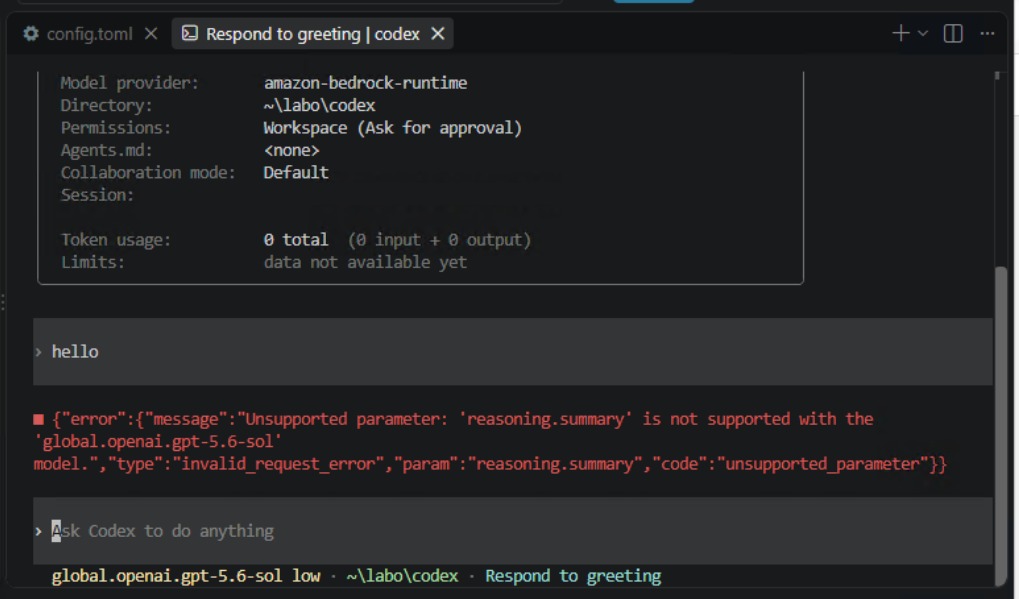
A normal /status doesn’t mean actual inference requests will work. Checking the provider connection is one thing; compatibility of real model calls is another. That’s what I learned here.
What I tried first that didn’t work
I tried making Codex treat it as a model without reasoning summary support:
model_supports_reasoning_summaries = false
In my environment, the same reasoning.summary error continued. I also considered writing my own models.json to override the model catalog, but that turned out to be unnecessary.
The setting that finally worked
Telling Codex not to request a reasoning summary at all solved it:
model_reasoning_summary = "none"
Before writing it into the config file, I tested it with CLI options (I gave the prompt in Japanese; here it’s in English):
codex exec --ephemeral --skip-git-repo-check --sandbox read-only --model global.openai.gpt-5.6-sol --config 'model_provider="amazon-bedrock-runtime"' --config 'model_providers.amazon-bedrock-runtime.aws.region="ap-northeast-1"' --config 'model_reasoning_summary="none"' "Don't use any tools or files. Reply with just OK."
When it runs, Codex first prints the settings for this run:
model: global.openai.gpt-5.6-sol
provider: amazon-bedrock-runtime
reasoning effort: low
reasoning summaries: none
Then, as the model’s own reply to the prompt, it returned:
codex
OK
I listed the settings output separately from the model’s actual reply since they’re different things, but on screen they appear one after the other:
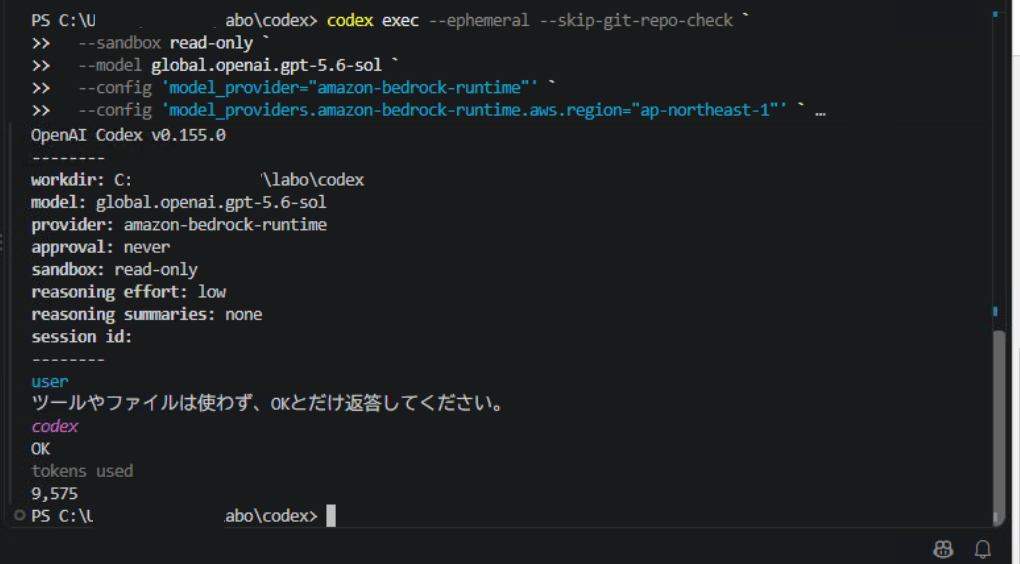
That was the first successful inference through Bedrock Runtime.
The final config.toml
With that confirmed, I added model_reasoning_summary at the top (top level) of config.toml:
model = "global.openai.gpt-5.6-sol"
model_provider = "amazon-bedrock-runtime"
model_reasoning_summary = "none"
The [model_providers.amazon-bedrock-runtime.aws] table at the bottom is unchanged:
[model_providers.amazon-bedrock-runtime.aws]
region = "ap-northeast-1"
Here too I was careful not to confuse whether model_reasoning_summary belongs at the top level or inside a table. It’s a top-level setting, so it has to sit above the first bracketed table line. Written below [model_providers...], it would land inside that table, where it doesn’t work.
After that, starting Codex normally with codex, typing “hello” gave:
Hello! What would you like to work on?

A proper reply. Importantly, model_reasoning_summary = "none" doesn’t turn reasoning off. The run output shows:
reasoning effort: low
reasoning summaries: none
So reasoning is still used; Codex just stops sending the “please return a reasoning summary” request that Bedrock doesn’t support.
ChatGPT Desktop picked up Bedrock too
After confirming the CLI worked, I restarted ChatGPT Desktop. It loaded the same settings, with the model provider shown as Bedrock. In my environment, the Bedrock settings in ~/.codex/config.toml are shared by Codex CLI with ChatGPT Desktop. The result: instead of signing in to ChatGPT to use OpenAI’s models, it uses AWS authentication with Amazon Bedrock Runtime as the model provider.

amazon-bedrock-runtime appears at the bottom left, with 5.6 Sol (Global) selected as the model. Without signing in, the desktop app uses the model through Bedrock as well.
What I learned
- Codex CLI v0.155.0 can use
amazon-bedrock-runtimeas its model provider - On EC2, it used the EC2 Instance Profile / IAM Role directly, with no access key stored
- Even when
/statusshows the right provider, real inference requests can hit model-specific compatibility errors - Using GPT-5.6 Sol through Bedrock Runtime from Codex,
reasoning.summarycame back asunsupported_parameter - Setting
model_reasoning_summary = "none"fixed it - ChatGPT Desktop read the same settings that worked for Codex CLI, using Bedrock as its provider
Reference
For the settings to use Codex / ChatGPT Desktop through Bedrock, I referred to this post (in Japanese):

コメント